

Food traceability is most useful when it works as part of everyday production, not as a set of records that someone has to piece together during an audit or incident. A practical system links what you receive to what you make, pack, store and despatch, so your team can follow a product or ingredient through each stage.
For food manufacturers, processors, meat, fish and cheese packers, this means connecting supplier records with shop-floor activity, finished goods and customer orders. Food traceability software can help create these links in one operational workflow, while also supporting stock control, yield analysis and quality checks.
Start with the traceability requirement
In England, Wales and Northern Ireland, food businesses must be able to identify their immediate suppliers and the businesses they supply. This is commonly described as “one step back, one step forward”. Records must be accurate and readily available to an authorised officer. Keeping available batch, lot or consignment codes is considered good practice. Requirements can differ by location and sector, so check the rules that apply to your operation.
The Food Standards Agency guidance for food traceability explains these requirements. Article 18 of Regulation (EC) No 178/2002 sets out the general traceability framework. Some sectors, including products of animal origin, have additional requirements.
The legal baseline is important. In a working factory, however, a clear internal link between materials, production batches and finished products can help you identify the scope of an issue more precisely. That means fewer manual searches and a better basis for targeted action.
A practical framework: goods-in to despatch
1. Goods-in: establish what arrived
Start by recording each delivery in a consistent way. Your goods-in process should connect the supplier and delivery to the product received, its quantity and any available lot or batch code. Depending on the product and your procedures, you may also capture dates, expiry information, storage location and relevant quality checks.
The important point is to keep the supplier’s identification connected to your own stock records. If a discrepancy needs checking, your team should be able to identify the affected delivery and prevent unsuitable or unapproved stock from entering production.
Consider how your system will handle:
- Supplier and delivery details
- Product description and quantity
- Supplier lot or batch code, where available
- Internal stock or location identification
- Quality status, including any hold or release decision
2. Stock and internal movements: keep the link intact
Traceability can break down when materials move between stores, production areas or sites without a recorded transaction. Each movement should preserve the link to the original lot and show where the material has gone.
This is particularly important when a delivery is split across locations or issued to more than one production run. Clear stock records help your team see what remains available, what has been used and what may need to be held while an issue is investigated.
3. Production: connect inputs to outputs
During production, record which ingredient and packaging lots were used in each batch. Where relevant, include rework and intermediate product, as these can also affect the genealogy of a finished item.
A useful production record links material inputs to the finished batch and captures the information your operation needs to review the process. This may include quantities, work orders, recipe or bill-of-material details, production timings, line information and quality checks.
The result is a practical two-way view: trace a finished batch back to its inputs, or trace an incoming lot forward to the batches in which it was used.

4. Yield and process records: understand what happened
Traceability is more useful when it sits alongside production data. Comparing material use with finished output can help production managers review yield, costs and waste. It can also highlight differences between expected and actual results for investigation.
The records should reflect your process, including finished products and relevant waste, rejects, by-products or rework. The right level of detail depends on your products and operational requirements, but consistent data makes it easier to understand what happened during a run.
5. Packaging and labelling: identify the finished product
At packing, ensure the finished product is clearly linked to the relevant production batch and the information needed for handling, stock control and despatch. Labels and case records are important parts of the traceability chain; they should match the product and production data.
A connected weighing and labelling workflow can help capture pack information and reduce repeat entry between systems. Hub & Spoke’s OCM-PRO weigh price labeller supports weighing, labelling, recipe and batch management, and traceability workflows. Its suitability will depend on your products, line setup and integration requirements.

6. Warehouse and despatch: record where each batch went
When finished goods are stored, picked and despatched, the system should retain the link between product, batch and customer order. Capture the details your operation needs to identify the goods supplied, the quantity and the relevant business customer.
This supports the “one step forward” record and makes it easier to identify which customers received a particular batch. It also helps warehouse and despatch teams work from consistent product and stock information.
What to look for in food traceability software
The right solution should reflect the way your operation works. Before choosing software, map a representative product from receiving through production, packing and despatch. Then check that the system can support the records and handovers involved.
A practical assessment should include:
- Lot and batch links: Can you follow inputs through production to finished goods?
- Shop-floor data capture: Can operators record activity at the point it happens?
- Stock movements: Are transfers and production issues connected to the original lot?
- Yield analysis: Can you compare material use and output for the level of detail you need?
- Quality processes: Can your team record checks and manage relevant holds or releases?
- Labelling and despatch: Can product identification and customer despatch records connect to the wider traceability record?
- Integration: Can the solution work alongside your current software and equipment?
Build around your existing operation
Traceability software needs to fit your processes, not force unnecessary change. Some businesses need a joined-up system across purchasing, stock, production and despatch. Others may want to add shop-floor capture or traceability to an existing setup.
Hub & Spoke’s Centric ERP is designed for food manufacturing and processing. Its modules cover purchasing, stock and inventory, production, complete traceability, yield and cost management, and despatch scanning. The modular SaaS approach can be configured to stand alone or coexist and integrate with existing systems, depending on your requirements.
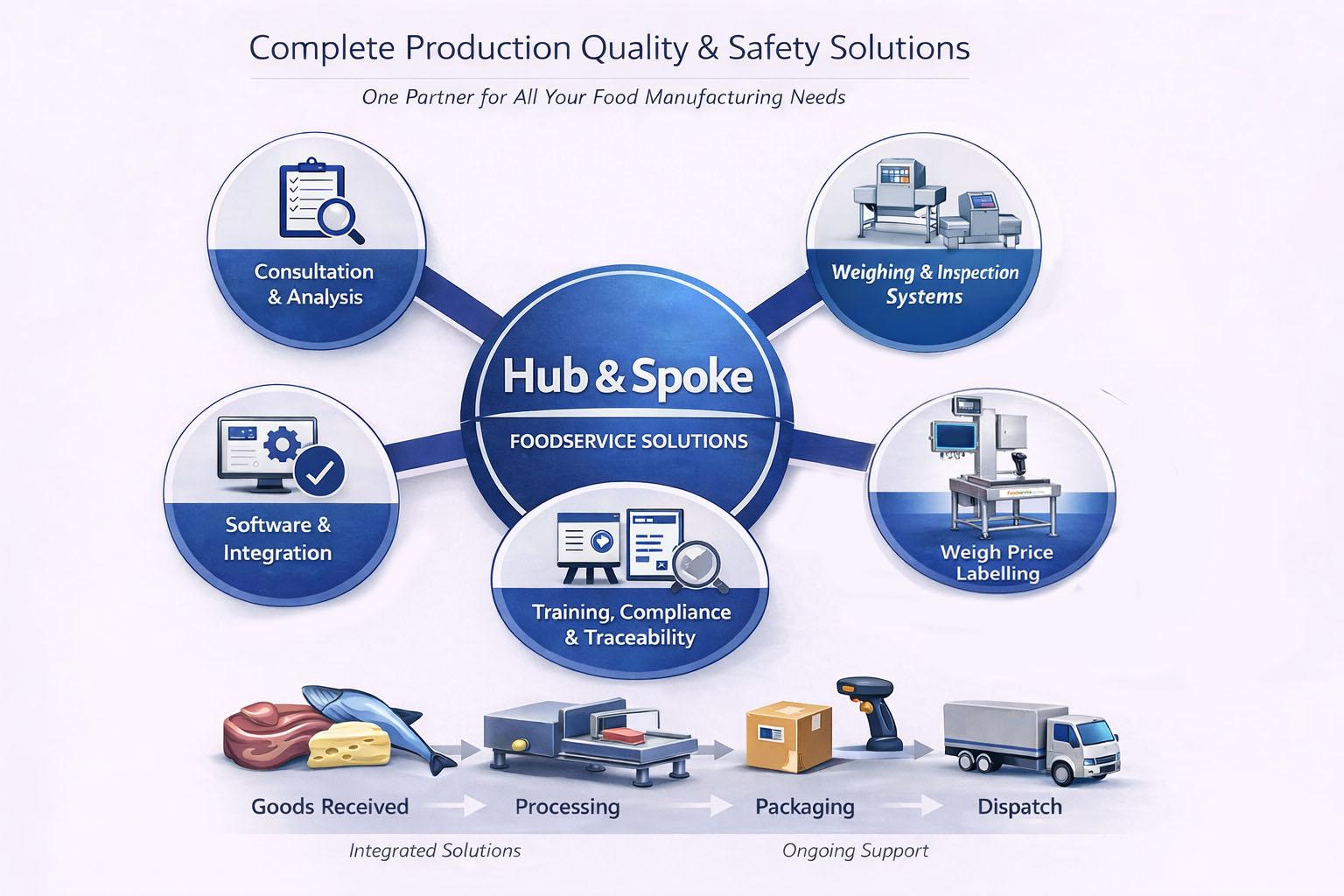
We also support the wider operational environment around traceability, including weighing and labelling equipment, barcode capture, installation, training and ongoing service. That means we can look at the software, machinery and process together when planning a solution.
Test the process before you need it
A system is only useful if your team can retrieve and understand the information. Run a planned traceability exercise using a real product or batch. Check whether you can identify its supplier inputs, production records, finished stock and business customers supplied. Record any missing links and assign actions to address them.
This also gives operations, QA and IT teams a chance to check that roles, procedures and equipment work together. A mock exercise should reflect the way your site operates, including relevant split batches, rework, transfers or partial despatches.
A connected approach from goods-in to despatch
A reliable framework gives each stage a clear link: goods-in records identify received materials; stock movements retain that identity; production records connect inputs to outputs; packaging identifies finished goods; and despatch records show the business customers supplied.
Food traceability software can bring these records together while supporting day-to-day production, inventory and yield analysis. The right setup depends on your products, processes and existing systems. We can help you review the requirements, identify where data is captured and plan a suitable software and equipment solution.
Contact Hub & Spoke to discuss your traceability requirements or arrange a practical review of your current process.
- Call 0121 289 9648 or Email us at enquires@foodservices.solutions or simply visit our website at https://foodservices.solutions/